
Overview
Getting Started
Gutenberg Blocks
Utility Functions
Design Kit Library
Cozy Blocks
Everything you need to install, configure and build with Cozy Blocks — searchable and organised by task.
Introduction
Cozy Blocks is a powerful toolkit for the WordPress Block Editor (Gutenberg). It is built to give you the best of both worlds: the simplicity of standard WordPress and the design power of a professional website builder. By adding to the tools already found in WordPress, Cozy Blocks gives you a massive library of custom blocks, ready-to-use patterns, and full-page templates. Everything is designed to be easy to use, fast to load, and ready to grow with your website.
The Philosophy
The main goal of Cozy Blocks is to replace heavy, slow page builders that often make websites sluggish. Instead of adding extra weight, we build directly on top of the native WordPress editor. This approach ensures your website stays lightweight and fast while following the best coding standards. With Cozy Blocks, you get the fine-tuned design control that professionals need, without the technical headaches or slow loading times usually found in other builders.
Installation & Activation
- Go to WordPress dashboard.
- Navigate to Plugins > Add Plugin
- In the search bar at the top right, type “Cozy Blocks“.
- Click Install Now, once installation is complete click Activate.
License Activation
- For Premium Users: If you have purchased a Pro license, enter your License Key in Dashboard > License tab.
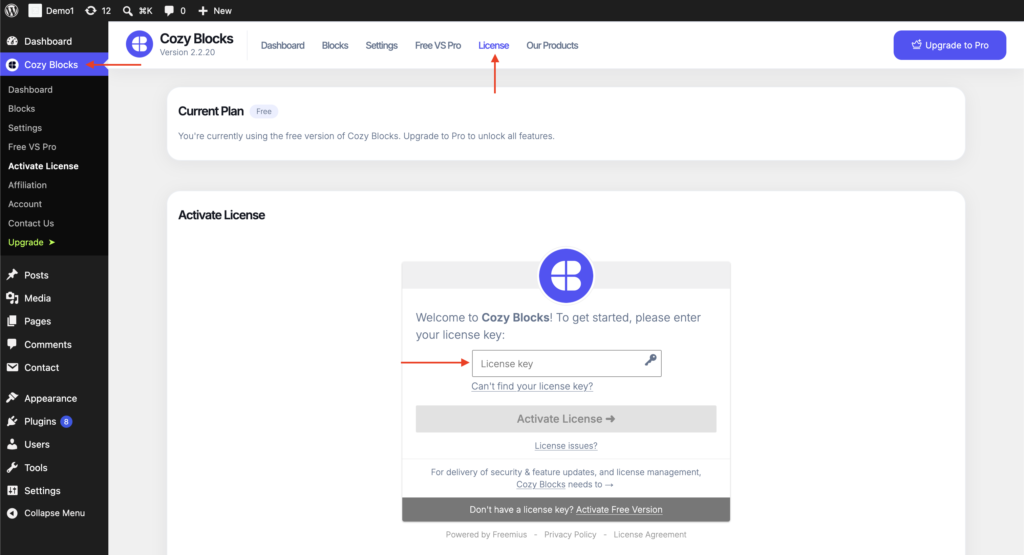
- For Free Users: The free version of the plugin is active by default.
Block Library
- Layout & Design
- Content & Marketing
- WooCommerce / Store Builder
- Blog, News & Magazine
- Team, Social & Portfolio
- Forms & Utility

Accordion
Present FAQs and content in expandable sections.

Advanced Tabs
Organize content into responsive tabbed sections.

Breadcrumbs
Display clear navigation paths across your site.

Container
Build flexible layouts with powerful containers.

Sidebar Panel
Create off-canvas side panels for any content.

Scroll To Top
Let visitors quickly return to the top.

Mega Menu
Create powerful multi-column navigation menus.

Pro
Toggle Switcher
Instantly switch between multiple content views.

Pro
After/Before Image
Compare before and after images interactively.

Icon Picker
Choose from hundreds of beautiful vector icons.

Slider
Create engaging sliders for any type of content.

Counter
Showcase impressive numbers with animated counters.

Pro
Countdown Timer
Create urgency with live countdown timers.

Call To Action
Drive more clicks with compelling call-to-actions.

Icon List
Display features with stylish icon-based lists.

Pro
Popup Builder
Create engaging popups for promotions and leads.

Progress Bar
Visualize progress with animated progress bars.

Portfolio
Showcase projects in beautiful portfolio layouts.

Featured Content Box
Highlight important content with eye-catching layouts.

Photo Gallery
Display stunning image galleries with ease.

Pricing Table
Compare pricing plans with modern pricing tables.

Pro
Scroll Animation
Create sticky scrolling sections with smooth animations.

Add to Cart
Add products to cart with custom buttons.

Pro
Product Slider
Showcase products in responsive sliding layouts.

Product Grid/Carousel
Display products in flexible grids or carousels.

Product Category
Showcase WooCommerce product categories beautifully.

Pro
Product Showcase Tabs
Organize products into category-based tab layouts.

Pro
Featured Product Tabs
Showcase featured, latest, and sale products.

All Product Reviews
Display all WooCommerce product reviews beautifully.

Pro
Product Quick View
Preview product details without leaving the page.

Pro
Product Wishlist
Let customers save products for later purchase.

Pro
Featured Products
Highlight handpicked products in custom layouts.

Pro
Post Slider
Showcase blog posts in engaging sliders.

Post Grid/Carousel
Display posts in responsive grids or carousels.

Pro
Popular Posts
Highlight your most popular blog posts.

Pro
Trending Posts
Showcase trending posts automatically.

Pro
Related Posts
Keep readers engaged with related articles.

Pro
News Ticker
Display breaking news with animated tickers.

Advertisement
Insert responsive advertisement banners anywhere.

Pro
Post Categories
Display blog categories in stylish layouts.

Pro
Categorized Post Tabs
Organize posts into category-based tabs.

Pro
Featured Posts
Highlight handpicked posts with beautiful layouts.

Pro
Featured Post Tabs
Showcase latest, popular, and trending posts.

Pro
Magazine Grid
Create modern magazine-style post grids.

Pro
Magazine List
Display articles in elegant magazine lists.

Pro
Post Comments
Show live comment counts for every post.

Pro
Post Views
Display post view counts to boost credibility.

Brand Showcase
Showcase the brands that you have worked with.

Teams
Introduce your team with stylish member profiles.

Testimonials
Display customer testimonials that build trust.

Social Shares
Let visitors easily share your content online.

Social Icons
Link your social profiles with stylish icons.
Portfolio
Showcase projects in beautiful portfolio layouts.
Photo Gallery
Display stunning image galleries with ease.

Buttons
Design beautiful buttons that drive more clicks.

Date & Time
Display the current date and time dynamically.

Pro
Contact Form 7 Styler
Style Contact Form 7 without writing CSS.
Google Fonts
Cozy Blocks provides a direct connection to the Google Fonts library, allowing you to browse and apply hundreds of professional typefaces across your entire website without any technical setup. You can find this setup under the block’s Style tab under Google Fonts panel.
Animation
Bring your content to life with high-performance entrance animations. Trigger smooth motion effects—like fades, slides, and zooms—as visitors scroll through your site. You can find this setup under the block’s Setting tab under Cozy Animation panel.
Responsive Visibility
Optimize your layouts for every screen by toggling block visibility for mobile, tablet, or desktop. This ensures a perfect, clutter-free user experience across all devices without any coding. You can find this setup under the block’s Setting tab under Cozy Responsive Visibility panel.
Advanced Styling Effects
Refine your design with professional tools like custom shadows, hover transitions, and z-index controls without writing code. You can find this setup under the block’s Setting tab under Cozy Advanced Effects panel.
Patterns
Copy-ready section designs.
Starter Templates
Full homepage starting points.